
Preferences
SuperSolo’s settings live with the other Chroma plugins’ settings in Edit ▸ Preferences ▸ Chroma ▸ SuperSolo. They are provided by the Chroma Preferences plugin.
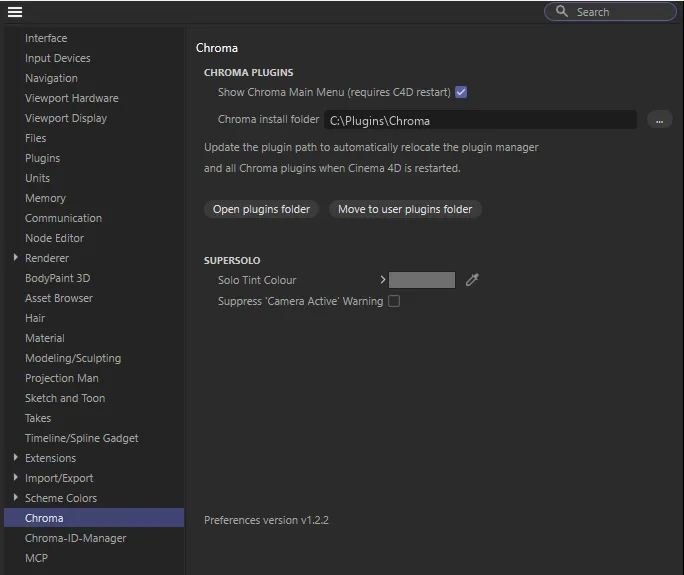
| Setting | What it does |
|---|---|
| Solo Tint Colour | The viewport background colour while a solo is on. See Seeing a solo. |
| Suppress “Camera Active” Warning | Stops the warning shown when you Ctrl- or Alt-click with a scene camera active. Ticking Don’t remind me again ever in that warning turns this on; untick it here to get the warning back. See Frame and zero. |
A new tint colour is used from the next solo.
Without Chroma Preferences
Section titled “Without Chroma Preferences”SuperSolo works without Chroma Preferences, with two differences: there is no viewport tint (the outline, button and status bar still show a solo), and there is nowhere to switch the camera warning back on once you have chosen Don’t remind me again ever.
The Chroma menu
Section titled “The Chroma menu”SuperSolo adds itself to the Chroma menu in the main menu bar. If you have turned the Chroma menu off in Chroma Preferences, SuperSolo is still available from Commander and Customize Commands — see Getting started.